Building flows
Step modifiers
Run if, Repeat, Retry, For each, Filter and Target — superpowers for any step.
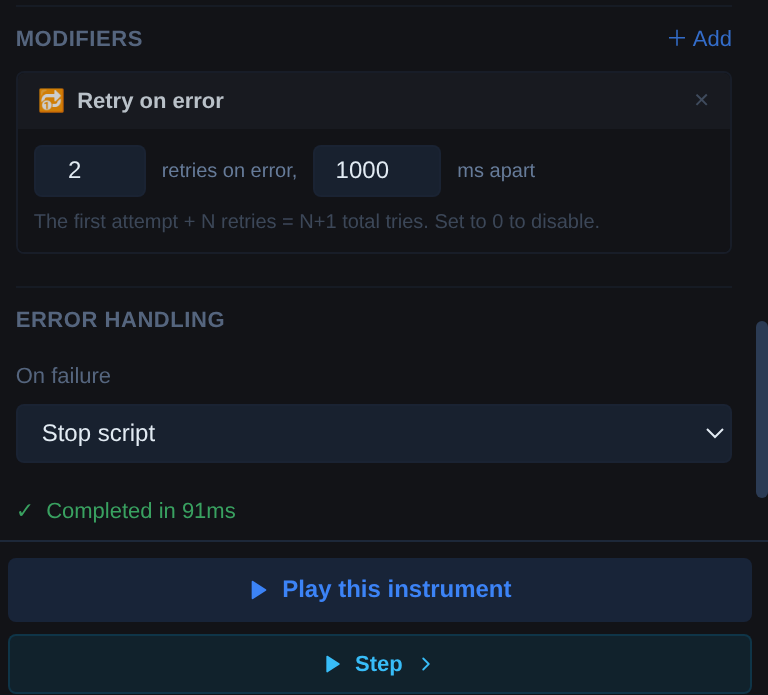
Modifiers bolt extra behavior onto a single step without changing your flow's structure. They live at the bottom of the config panel — click + Add in the Modifiers section, pick one, and configure it inline. Active modifiers show as cards you can edit or remove.
Three of them (For each, Filter, Target) only appear on steps that have a selector, because they change which elements the step acts on.
Run if#
Skips the step unless a JavaScript condition is true. Reference variables with $name:
$account.plan === 'pro' && $seats > 1
Use it to make a single step optional — for branching over several steps, use the Condition container instead.
Repeat#
Runs the step N times in a row (2–999). Handy for "click Load more five times".
Retry on error#
If the step fails, tries again — N retries, a fixed delay apart (defaults: 2 retries, 1000 ms). The first attempt plus N retries means N+1 total tries. This is the first thing to reach for on steps that fail intermittently because a page is slow.
For each#
Runs the step once for every element the selector matches, in document order or reversed. Where Each loops a block of steps over data, For each loops one step over elements.
Filter#
Narrows the matched elements before the step acts:
- Visible only — drop hidden matches.
- Has text / Not text — keep only elements containing (or not containing) a piece of text.
Target#
When a selector matches several elements, the step normally acts on the first. Target switches that to the last, or the n-th (0 = first). Combined with Filter, this usually beats writing a more contorted selector.
Error handling#
Below the modifiers, every non-container step has an On failure setting: Stop script (default) or Continue to next step. Continue is right for best-effort steps — dismissing an optional banner, say — where failure shouldn't sink the run. For structured error handling around a whole block, use Try / Catch.